
Let's Go Workout
App for Fitness Noobies
My Role
UX Designer
UI Designer
Team
Eugene Voung
Jorge Garcia
Oscar Vasquez
Tools Used
Figma
PowerBi
Project
The task was to build a solution that could help gym-goers track their workout progress, including remaining reps, a built-in timer, and frequently used exercises. Collaboration with a team of software developers was key in integrating the design with the underlying technology.
I contributed to the design and planning of user interactions by creating the app’s layout, ensuring that the interface was intuitive, visually clear, and aligned with user behavior in active workout environments.
Background
Users often had to mentally count each rep and remember which exercise came next, which broke their focus and added unnecessary friction during workouts. With the new system, we aimed to eliminate those pain points by creating a centralized space for tracking exercises, reps, and timers, it was an all in one intuitive interface.
The Challenge
Beginner Gym-Goer Use Case: I focused on users who had recently started going to the gym, many of whom were exploring fitness apps for the first time. The most common complaint among this group was the lack of accessible, beginner-friendly tools.
Many of the available apps required a paid subscription and offered pre-built workout programs that couldn’t be adjusted to their personal goals or fitness levels. Beginners felt frustrated by the lack of customization and guidance.
Software Developer Use Case: I also considered the needs of the development team, as they were responsible for implementing the designs I created. Through in-person meetings, Slack discussions, and technical reviews, I learned that developers required the UI to follow consistent logic and reusable component structures to streamline the build process.
To support this, I documented edge cases and added detailed annotations within my design files to reduce ambiguity during handoff. This approach helped minimize back-and-forth, ensured smoother implementation, and fostered better alignment between design and development.
Research
Once I had gathered enough research, I began creating storyboards to visualize how users would think through their workouts. The goal was to capture the mental and physical steps a user takes when engaging with the app during a gym session.
The main character in this storyboard is a beginner gym-goer who needs structure and guidance to stay on track. This sequence follows the user from the moment they enter the gym and decide what to do, to logging their exercises and tracking reps throughout their session.
The storyboard highlighted the need for a simplified, low-effort tracking flow. It could especially be used during moments when users are fatigued and less motivated to manually log their progress. These insights directly informed the layout and interaction design, ensuring the experience remained smooth and supportive, even as user energy wanes mid-workout.
Storyboard
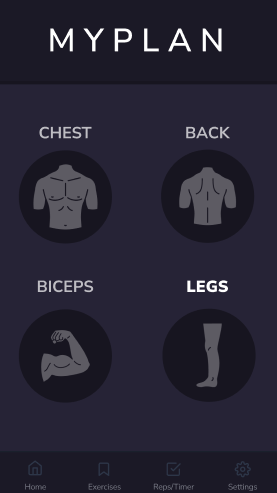
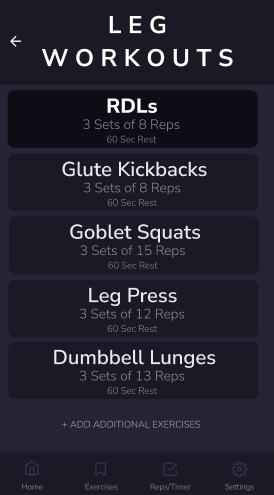
In this scenario, a solo gym-goer uses the app to find their list of leg workouts. The user starts by opening the app and selecting the body part they want to train. Once selected, the app displays a tailored list of leg exercises pulled from their routine.
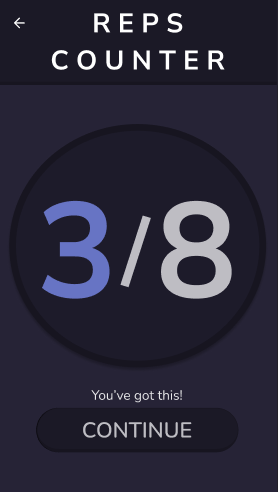
After selecting the exercise, the user browses a list of recommended exercises tailored to their routine. They choose a leg-focused movement, such as squats or leg presses. They then tap to begin.
The app responds instantly with haptic feedback and a subtle animation, confirming their selection. A detailed exercise screen appears, showing the number of sets, target reps, and rest time.
I created an interactive prototype in Figma to demonstrate how the app would track workouts, including exercises, progress, and timed rest periods. The prototype allowed stakeholders to experience the full user journey and understand how the features supported real-world gym behaviors.
Stakeholders appreciated the focus on identifying real users who would benefit from the app, especially the way the design was structured to be implementation-friendly for their junior development team. The clear layout and reusable components made it easier to translate the design into code.
As a result of the presentation, the team decided to move forward with preparing the app for release, taking steps toward publishing it on official platforms.